


Last week I violated my own rule of social media: I posted a rant that wasn’t actionable.
TLDR my rant: Most AI content induces fear and FOMO. Influencers and algorithms symbiotically profit from keeping us impressed and confused. Aman Khan calls it a “race to the bottom.” We’re in an AI-hype-industrial complex.
The solution is for real operators to share how they’re really using AI at work. Together, we can drown out the "this model is INSANE" posts, magic-spell prompts, hasty infographics, and "comment to get my pdf/prompts/belly button lint."

If you feel inhibited: It doesn’t have to be novel or fancy. We're all hungry to know what you're doing, what's working—or not—for you.
Except operators don’t have time. Not to write posts, and definitely not to “learn social media.” I asked you to post more, with no way to do it.
So I’m freely sharing the AI Skill I use to write my social posts. “The People’s Post Generator” is an AI Skill, basically a folder of text files that an LLM can pull into conversation when relevant.
The People’s Post Generator
I’ve been growing a little folder of text files to help me write my social posts. It helps me take a messy idea (Slack screenshot, Whatsapp chat export, Granola transcript, or just speech-to-text rant) and sculpt it into a post I’m proud of.
I feel proud of posts that are personal and practical. My process goes like this:
Get excited about something I experienced, and make a screen recording (e.g. Loom, Screen Studio, Cap, etc.)
Copy the transcript into AI chat (Cursor in my case) and tag the
@peoples-post-generatorfolderAI then asks me one question at a time to get more context out of me, deciding together on the focus, and drafting the post.
I share back my drafts, and AI holds me accountable to my own bar for publishing.
These text files grew through use, not Prompt Engineering™️. Each time AI flubbed, I added a line of instruction. If I came across an example I liked, I’d copy-paste it in.
Slowly, it became useful to me. When friends mentioned social posts, I'd zip the folder and send it over. After the seventh time, I decided to share it with the world.
Quick start guide
A Skill is a folder with text files:
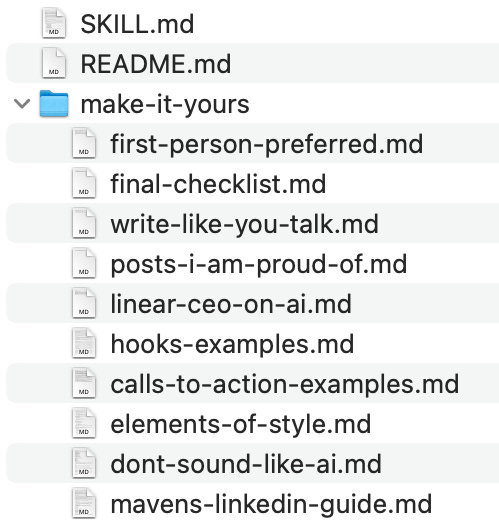
You can read each text file yourself. It contains:
A lightweight process
Bank of examples (non-cringe “hooks,” posts, calls to action)
Guides to good writing (how not to sound like AI, a directive to write like you talk, and a TLDR of The Elements of Style)
You can use it in with favorite LLM:
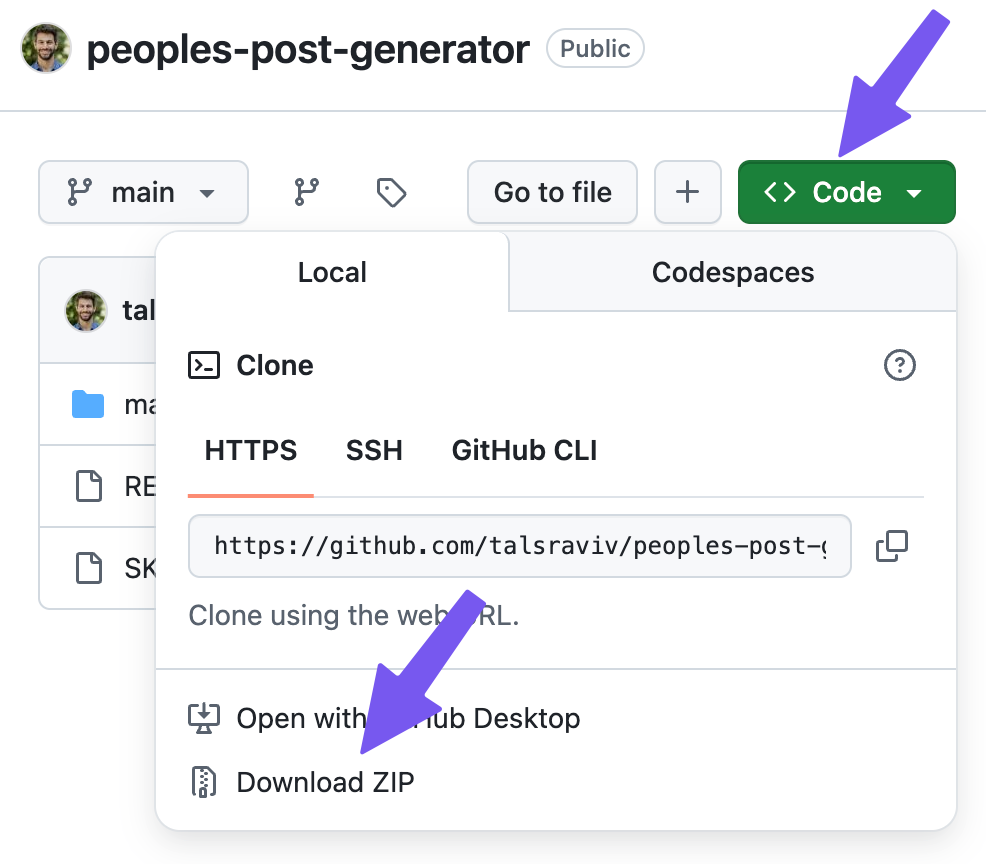
1. Download the zip file to your computer
Head over to the People’s Post Generator Github page and download the zip file:
2. Give it to your LLM of choice
ChatGPT/Gemini tutorial
These steps are the same for Gemini, using “Gems.”
Claude web tutorial
Cursor tutorial
These steps work for any VSCode-based AI code editor (e.g. Antigravity, Cline, etc.)
Claude Code/Claude Cowork tutorial
3. Give AI a messy idea
I love Gary Vaynerchuk’s commandment to “document, don’t create.” This AI skill is perfect for raw records of conversations and experiences. Throw any of these into the chat box and ask it to use the skill to help you turn it into a post:
Screen recording transcript (my favorite)
Slack thread screenshot
Whatsapp chat export
Meeting transcript (Peter Yang did this mid-call)
Rant into your favorite speech-to-text app
Or a nearly-finished post you wrote on your own
AI will figure out where you are in the process and continue the conversation from there.
4. Make it your own
This skill works out-of-the-box. However, the folder make-it-yours/ is well, completely yours. Once it’s on your computer, feel free to delete anything, add your own ideas, or remove examples that you don’t like. (In fact, you can edit the whole thing, SKILL.MD, included.)
5. [Optional] Contribute improvements
Most of the changes you’ll make to this will be personal (examples you like, your personal bar for posting something). However, you might find ideas that are relevant to other people using this skill (whatever their taste). For example, a better conversation experience, or a way of making this skill more likely to get picked up by AI.
If you find a universal improvement, I would love for you to open an issue or even make a pull request:
Open a coding agent (Cursor, Claude Code, etc.)
Tell it:
I want to make a pull request to this github repository but not sure what to do: https://github.com/talsraviv/peoples-post-generatorLet AI hold your hand through the process.
Power to the humans
I created this for myself, gradually and organically. I needed something that would hold me accountable to my own standards when I'm tired and tempted to just hit publish.
Now that it belongs to everyone, real people can call me out when I don’t follow my own rules, not just AI.
If AI skills are new to you, the best way to learn is by doing: try the tool. And if you want to learn how to evaluate this kind of fluency in PM interviews (or demonstrate it yourself), I'm co-hosting a free Lightning Lesson with Ben Erez and Aman Khan:

* Please don’t infer my political views from this post.**
** Please don’t infer my political views from this footnote.***
*** I’m staunchly pro-footnotes.
Unreal, thanks. 🙌
Oooh looking forward to trying this! I’ve enjoyed Hilary Gridley’s CustomGPT for writing, and I like to compare.