


Imagine building an AI product where you can’t pick the model, the prompt, or the context. You can’t control what skills or tools are installed. You can’t even choose the harness - it might run anywhere. And bonus: no observability.
But don’t worry, you’re still responsible for its output and quality. Welcome to PMing an MCP.
MCP as a growth bet
I’m helping a financial platform ship its first MCP connector. The platform has supported over $10 trillion in deals and is used by 7 of the 10 largest investment firms in its asset class.
MCP will help the platform grow: Analysts are currently the main users. Now, with conversational AI, C-level executives can make high-level requests (e.g. a strategy health check, pipeline critique, or headcount insights) that once took skilled people days. Getting this right could improve retention and expansion.
These finance executives, however, are unforgiving of mistakes. They won’t try again next week. And they won’t tell the difference between the LLM and our product.
We want an executive to type a 6-word prompt and trust the result… but trust is lost in buckets and gained in drops.
How hard could it be?
Naively, my first thought was, "let’s ship atomic read/write calls, the LLM will make it work, and we’ll optimize from there.”1
The team built a proof of concept, and we quickly discovered:
While frontier models know a lot about this domain, there’s a gap between trained knowledge and each firm’s investment strategy, internal processes, and custom data schema.
There’s ambiguity between the words humans use at each firm, and what their entities, fields, and metrics are called in the system.
These are high-stakes use cases where mistakes cost reputations.
Involving precise numerical calculations.
Greaaaaat.
Is our MCP good?
To discover those shortcomings, we first gathered a dozen prompts we expected our customers to type, and put them in a Google sheet. These ranged from “What are near term capital requirements required to fund XYZ” to “Is there anyone in the org that runs a more effective due diligence checklist than we do in our business unit?”
Where did these prompts come from? Luxuriously, we had experts inside the company who came from the industry and spent all day with customers. They could offer us educated guesses of what every persona, from analyst to CEO, might type into AI. It was a good starting point.
Early on, “evals” meant getting the experts, eng, and product in a room, typing in those prompts, and crying—I mean, brainstorming improvements. Everyone would notice something else going wrong: engineers caught inefficiencies, experts (usually sales or solution engineers) noticed wrong answers, and product… mainly wrote things down and scheduled the next round.
We also asked the LLM for its feedback by pasting this at the end:
Give notes for improvement for the developers of the MCP connector (differentiating this from the actual data in the customer account, or the LLM agent’s behavior, which the developers do not control - focus on what the developers can do to set up the customer account and LLM agent for success).
Only include recommendations that are actionable, important, and based on what actually was observed, not hypotheticals. Assume the person reading the feedback did not see the full thread, only what you’re writing.
It was painful to watch, but it gave us clear direction. Everything else paled in importance to the time we spent together in a room watching a subject matter expert kick the tires.
What’s under our control?
There’s nothing special about MCP, just like there’s nothing special about USB (or screw threads, AA batteries, Bluetooth, or A4 printer paper). A bunch of companies said, “hey, wouldn’t it benefit everyone if things connected in the same way?” In the case of USB, it’s the shape of metal wires. In the case of MCP, the companies agreed to put their docs in the LLM’s context window.
An MCP connector is a bunch of API calls, each accompanied by brief explanations.2 So, to overcome the 4 gaps above, we had two levers:
The deterministic tools (available data, search, speed, reliability, security)
Custom instructions for the LLM (tool descriptions, error messages, and skills)
Product could help with the latter. Just like some product teams use AI to prototype visual UIs, our team uses AI to prototype the MCP. Our engineers invested an hour in getting us all running locally, which allowed us to modify descriptions or stub out new tools, then test them in our favorite agent. To get our changes in, we send patch files to engineers over Slack.
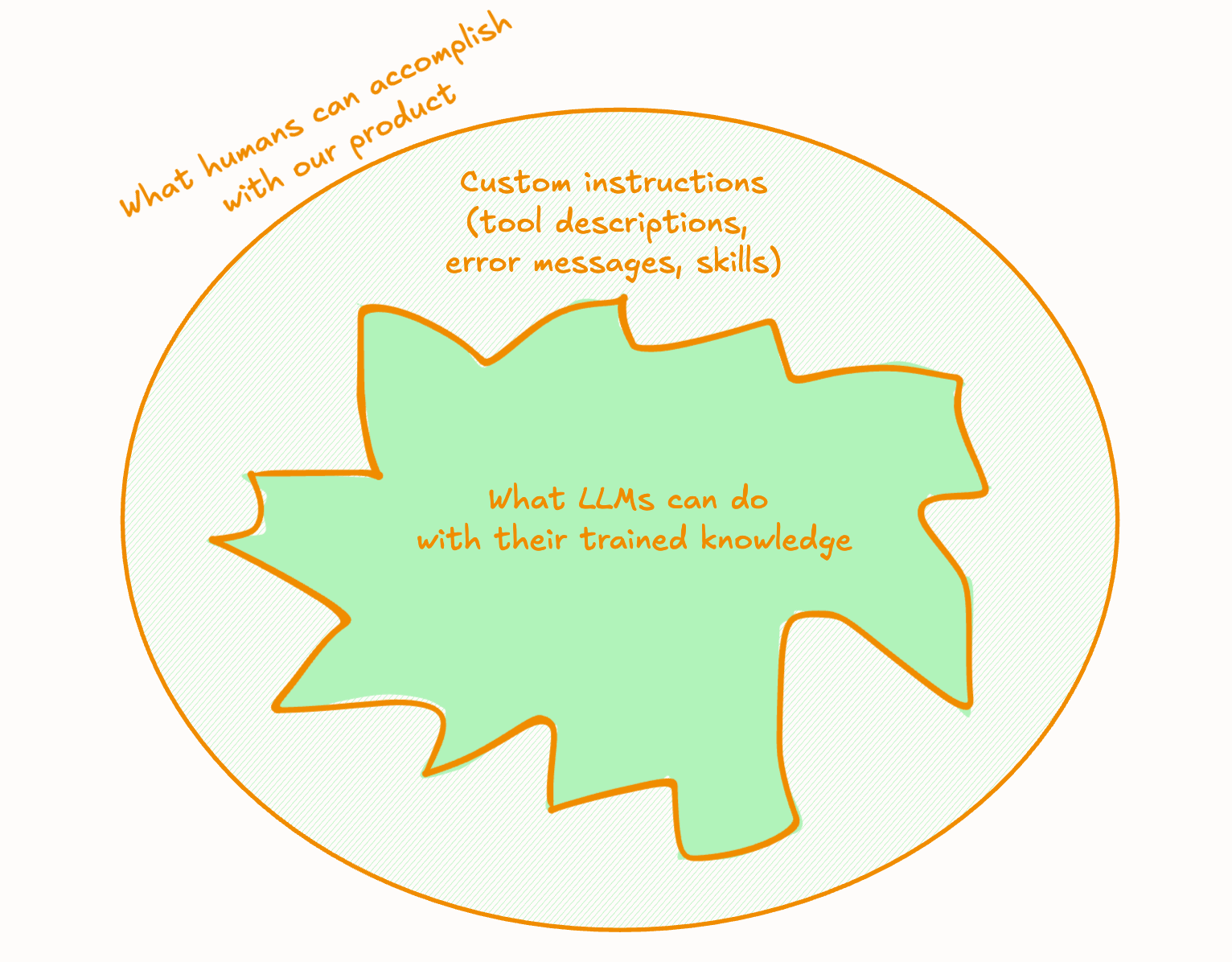
Another lever we have is our enterprise implementation team. Worst, worst, worst case scenario, they can help customers create custom skills on top of our MCP product. Since skills are just text files, this might take the form of a “custom instructions” text box in each customer’s account settings, and a tool called hey_llm_call_this_tool_first_to_get_important_info.
We want neither to add work to their plate nor to make them the bottleneck for adoption, so we hope to solve things in the product itself, limiting ourselves to what is widely compatible (read: supported by Microsoft Copilot).
Automating evals for an MCP
Evals answer the question: “Can we give this to a customer?” (Over time, that question becomes, “We made a change. Can we push it?”)
We started by pasting prompts from our Google sheet into Claude Cowork and hitting enter. That can’t last forever, especially as we:
Add more user test prompts
With more criteria for “good”
Run each test prompt multiple times (lesson already learned)
Across more data test accounts
Over more models
In more harnesses (Cowork, Codex, Copilot, etc.)
And release more frequently
…we’d be wise to automate. We’re doing that gradually:
Run test cases manually, and evaluate manually (gotta start somewhere)
Run test cases automatically, and evaluate manually (very, very helpful)
Run test cases automatically, and evaluate automatically (working on it)
To get from #1 to #2, we signed up for a hosted eval platform. We imported our list of test prompts, and our account looked like a glorified Google sheet.
Running test prompts automatically3, though, was a game changer. With one click, I could run a few dozen prompts, each one three times, in less time than it took me to make coffee. I could then spend my entire coffee seeing the effect of the latest changes.
Moving to an evals platform got us talking in test cases and traces (i.e. the agent chat thread). We could now back up our hypotheses with links to traces, and define milestones as groups of use cases (we named one dataset “Test cases that have to pass to start the beta”). Engineers then copy the traces into their coding agent to brainstorm code changes.4 It’s the ciiiiiiircle of liiiiife 🎶
We’re currently setting up #3: full automation. To do that, we need to set up automated “scorers” or “graders” of each of our test runs. Our team cares about things like:
Did the agent navigate our MCP tools efficiently? (vs. wander in the desert)
Did the agent do numerical math deterministically? (vs. “LLM math”)
When faced with ambiguity, did the agent stop to ask the user? (“Show me deals over $10M” could mean a lot of things)
We use both code graders and LLM-as-a-judge, but we don’t yet trust them. Currently, we’re iterating on the graders as much as we are modifying our MCP. I’ll run test cases, then run the graders, and read the results. I’ll come away thinking “wow we need to fix our MCP” or “wow this grader is really untrustworthy, we need to fix that instead.”
(A few of our test cases have expected values, which is the dream, but not the majority. This is what that looks like.)
Creating a grader is kind of like onboarding a new employee. We shadow them and still do our own checks. We hope to eventually trust their judgment so they can run without us.
Next: observability for MCP
The best source of test cases is from outside the building, and today our MCP launched in closed beta 🎉 Our early customers are friendly and eager to give us feedback, but soon we’ll need a more systematic way to understand what’s happening.
With normal AI products, observability is easy to wire up (often paired with your favorite evals platform). But what about an MCP connector that runs on your customer’s computer, with their agent?
Some ideas we’re testing:
A submit_feedback tool that the LLM can call when it finishes a deliverable. It prompts the user for their feedback + consent, then self-reports an anonymized trace (hey, better than nothing).5
Giving each tool an optional argument like reasoning or intent to let the model submit its thinking.
Use hooks to convert chat threads to traces, inspired by Posthog’s plugin (they made it opt-in, but hooks appear to let plugin developers send your entire conversation to their servers if they wanted 😬).
Accept that, at scale, we’ll only be able to log our tool calls, not user input or LLM reasoning.
If you’re working on observability for MCP connectors, I’d love to brainstorm together! Just reply to this email.
-Tal
Thank you to Eric Xiao and Ursula Sage for reading early drafts of this.
It’s trendy to say, “design tools around workflows, not API calls” etc. etc. Starting there would be a premature optimization that risks precluding surprising customer use cases. That said, providing something composable like a CLI, a query language, or code execution is best of all worlds, and probably in our future.
Don’t take my word for it, ask your LLM. Even better, try the onboarding for Proof by Every, a product that brilliantly shows you what MCP is by not following the standard.
One caveat is that our simulation is only as valuable as its similarity to the customer’s harness. With MCP, it’ll never be perfect, but we still notice situations where something happens in Claude Web, but we can’t reproduce it in our evals platform, even if we use the same model and system prompt. We’re still thinking through this.
“Read the trace and come up with a change” is now being automated too 🤩 check out this excellent talk on LangSmith Engine, and how Eric Xiao achieved this with a single markdown file.
Thank you, Tal. Your point about not controlling the harness or installed skills feels especially important. One fallback we have considered is exposing a concise get_usage_guidance tool through the MCP itself, similar to the “call this first for important context” tool you mentioned. It would not be as context-efficient or reliable as a natively installed skill, but it could provide portable guidance when skills are unavailable.
I am exploring this in the context of Sage, an inner-work product that other agents could involve when they notice a user may benefit from deeper reflection. The challenge becomes more pronounced there: if Sage cannot control the model, prompt, surrounding context, or presentation, how much of the inner-work experience should it actually delegate? My current hypothesis is that the MCP should initially help agents recognize Sage moments, request consent, and hand the user off, while Sage retains responsibility for memory and the actual intervention. Your eval and observability approach gives me a useful framework for testing how much more can safely be exposed over time.
Great post, Tal. We felt this pain as well when we built a 50+ MCP library for one of our clients. We ended up building a skill library that would tell the MCPs how to best use tools to answer different types of questions, then connected it to a closed loop eval system where an LLM would both evaluate the performance and then tune the skills accordingly to eventually get performance where we wanted.
This is, of course, after we tuned the tool schemas and descriptions to be context efficient minimize procedural errors.
Also, on skills vs tool descriptions... assuming that you're loading all your tools at once with the MCP, I would just be careful of overloading tool descriptions with too much information since that will create context bloat, whereas skills get loaded based on the user query