


Lots of live time together this week!
Tomorrow Hilary Gridley, Aman Khan and I are banding together to bring you a free Lightning Lesson to give you a repeatable system for validating AI ideas cheaply: How to Know What AI Products to Build.
On Thursday, Aman and I are embark on our second cohort of Build AI Product Sense.
Thanks to Lenny choosing us for “Top course in product,” you get $375 off and $1,395 in free credits.
Thanks to Aman being….Aman, we’re giving away mac minis.
In 21 days Granola paywalls my AI agent’s access to my own transcripts. Watching Cursor & Claude Code export them showed me how AI agents proactively manage their own context.

Exporting all my meeting transcripts is a deceptively difficult challenge for an AI agent, because MCP responses go into the context window no matter what the next step is.
This is fine for “what’s the weather” but for an entire meeting transcript that just needs to be saved to a file, that’s really inefficient and unnecessary. Since I don’t need the LLM to engage with the transcript (just save it to a file), this quickly fills up the context window for nothing.
Ideally you’d be able to chain MCP tool calls to skip the context window, so the output of “get transcript” gets piped straight into “write file.” (This is how Clawdbot/OpenClaw works btw.)
These inefficiencies ended up being a gift because I found myself with a context-intensive task that would overwhelm Opus 4.6’s context window. Kind of an AI “will it blend.” With an impossible task at hand, I asked both Cursor and Claude Code to export all my Granola transcripts locally, same prompt, both using Opus 4.6.
Both surprised me! While they took different approaches, I loved that both made “context management” part of their plan.
💠 Cursor’s approach
For both tools, I first enabled the Granola MCP. Because the paywall is still three weeks away, I still have access to the “get transcript” tool call.
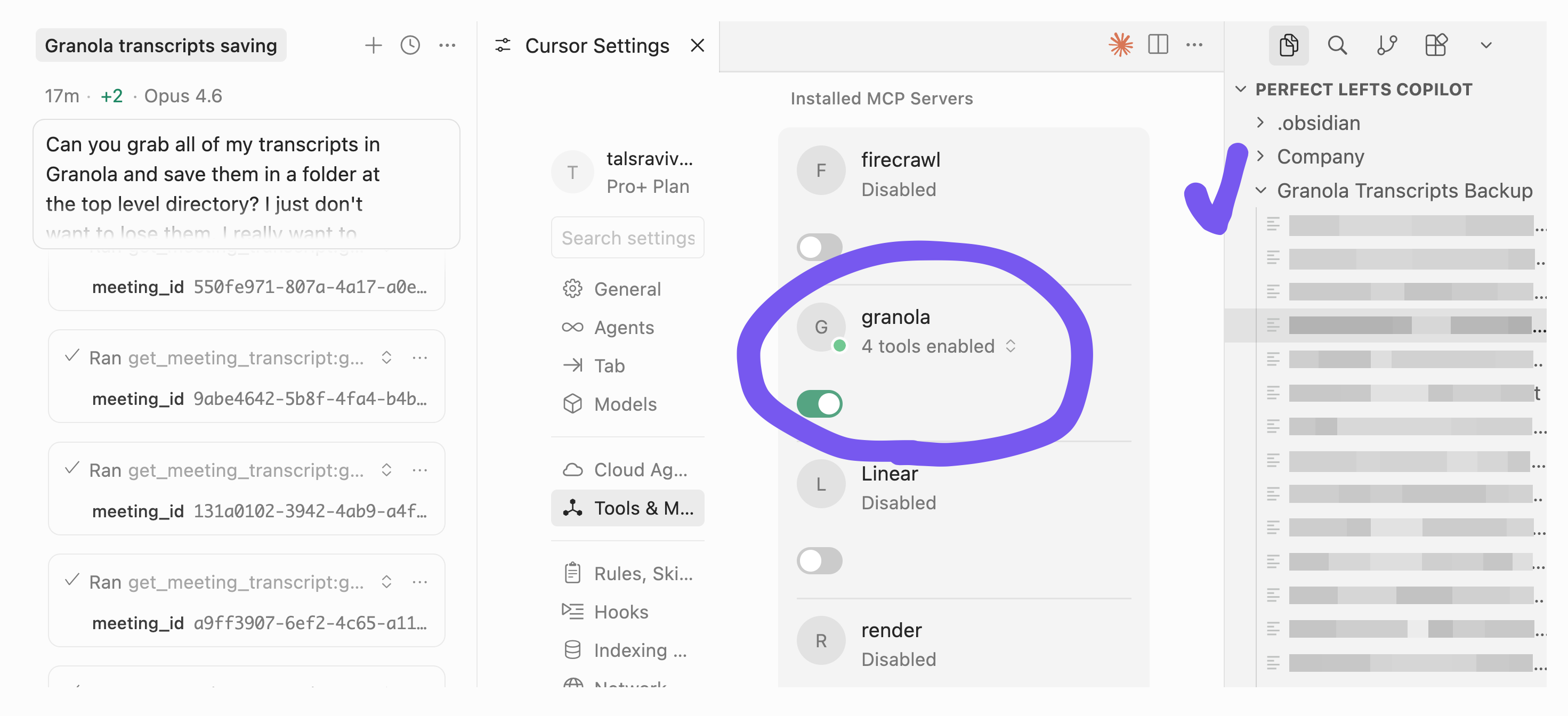
Cursor proceeded to:
List transcripts in Granola’s server
Fetch & save each transcript one at a time
Context window runs out quickly
Auto-compact the context to keep going
Until this point, it’s what I expected. But I noticed that “clear space in my context” was part of the agent’s plan. It was doing it strategically! (reminds me a lot of Claude playing settlers of Catan for 75 minutes)

Notice the line “…once I clear space.” How freaking interesting is that?
👾 Claude Code’s approach

Claude Code proceeded to:
List transcripts in Granola’s server
Dispatched 6 subagents in parallel, each fetching 25 transcripts
--- that’s it ---
Ok fine there was one last step… it took forever (yes, with 6 agents in parallel, more below).
It was so cool to see both products take on the same task, same model, different tactics. The differences are not as interesting as what they have in common: both agent harnesses are super aware of their own capabilities and formulating strategies around their own context window.
They know what their own limits are, and they know what their tactics and strategies to handle those limits, just like they use any other tool.
If you insist I look at the differences, I don’t necessarily think that one strategy is better than the other. Think about it: “compacting your chat thread over and over again” isn’t very different from “spawning a subagent.” The only difference might be that you can run subagents in parallel, which didn’t matter here since the bottleneck was Granola’s rate limits. So, maybe Cursor knew what it was doing.
(Another note about the differences: this is not a systematic evaluation. If I ran this 10 times, they might each employ both strategies equally.)
So much to think about in this seemingly routine task! Go do this while you can - more for the learnings than the loot.
P.S. Credit to Adam Fishman for doing this first and tipping me to the fact that we’ve all been put on free business trials (so the MCP server is still, for now, giving us access to the “get_meeting_transcript” tool).
If one has both Claude code and cursor, should we use one vs another or are there opportunities to integrate both and use?
Hey Tal. I'm going through the same process of exporting my transcripts. Hopefully it will be a straightforward process 😅 I was wondering, which alternative are you choosing to replace Granola? Thanks