


I recently watched a 80-second video by Anthropic showing Claude Opus playing Settlers of Catan for 75 minutes, using a single chat thread.
It did this by frequently and intelligently pruning its own context. Watching this made me realize that a big part of “long-running agents” will be a new term called “context editing” (also known as “compaction” also known as “$%@&-I-ran-out-of-room-please-summarize-this-thread-for-me-so-I-can-start-a-new-one”)
A few days later, I noticed that Claude Code’s /compact command allowed me to add optional custom compacting instructions!

This new (?) feature reminded me a lot of the Catan demo, which felt like an important learning opportunity as a PM. I don’t aspire to be an AI engineer, but I do want to understand one layer down.
I realized this option in Claude Code allowed me to be a partner in the “context editing” process: I can help decide what to summarize vs. preserve granularity. When Claude Code has a new feature, I pay attention, because features that start in Claude Code tend to show up in what Anthropic offers to developers.
I figured it’s important as a PM to see for myself how this works inside Claude Code. But to do that, I’d have to crack it open.
I had no clue how to do that, until Abhishek Katiyar and Aman Khan gave me the key hint: Claude Code stores all your conversation history as text files on your computer.
Below are the steps I took to watch compaction happening with my own eyes. If you’re a product builder looking to build your AI product sense, I highly recommend making time to try this out yourself.
If it feels intimidating, remember: it’s all just text files on your hard drive.
Here’s how to experience this yourself:
Create a new empty, throwaway directory anywhere on your computer
Open it in Claude Code and give it a Sisyphean task (I told it to
Create a separate text file for each word of the Gettysburg Address, pinging me in between every file.)While that runs, visit your user’s root directory (one directory above your Desktop, aka
~)

Press Command+Shift+Period (Mac) to show hidden folders. In Windows file explorer click View > Show > Hidden items
Click on
.claude/folderFind the
projectsfolder and click on the one that corresponds to your throwaway directory, above (This is the behind-the-scenes of Claude Code’s brain for something you’re working on, not the actual folder you’re working on)

Use Cursor/VSCode (free) to open that folder.
Install the VSCode JSONL Gazelle plugin (open source, thank you Gabor Cselle!)
Open the most recent JSONL file you see there - each row is a message in your conversation!
Run the
/compactcommand in Claude Code with any custom instructions, e.g.Preserve the last 5 turns of our conversation.Watch what happens in the last rows of that file as you compact.
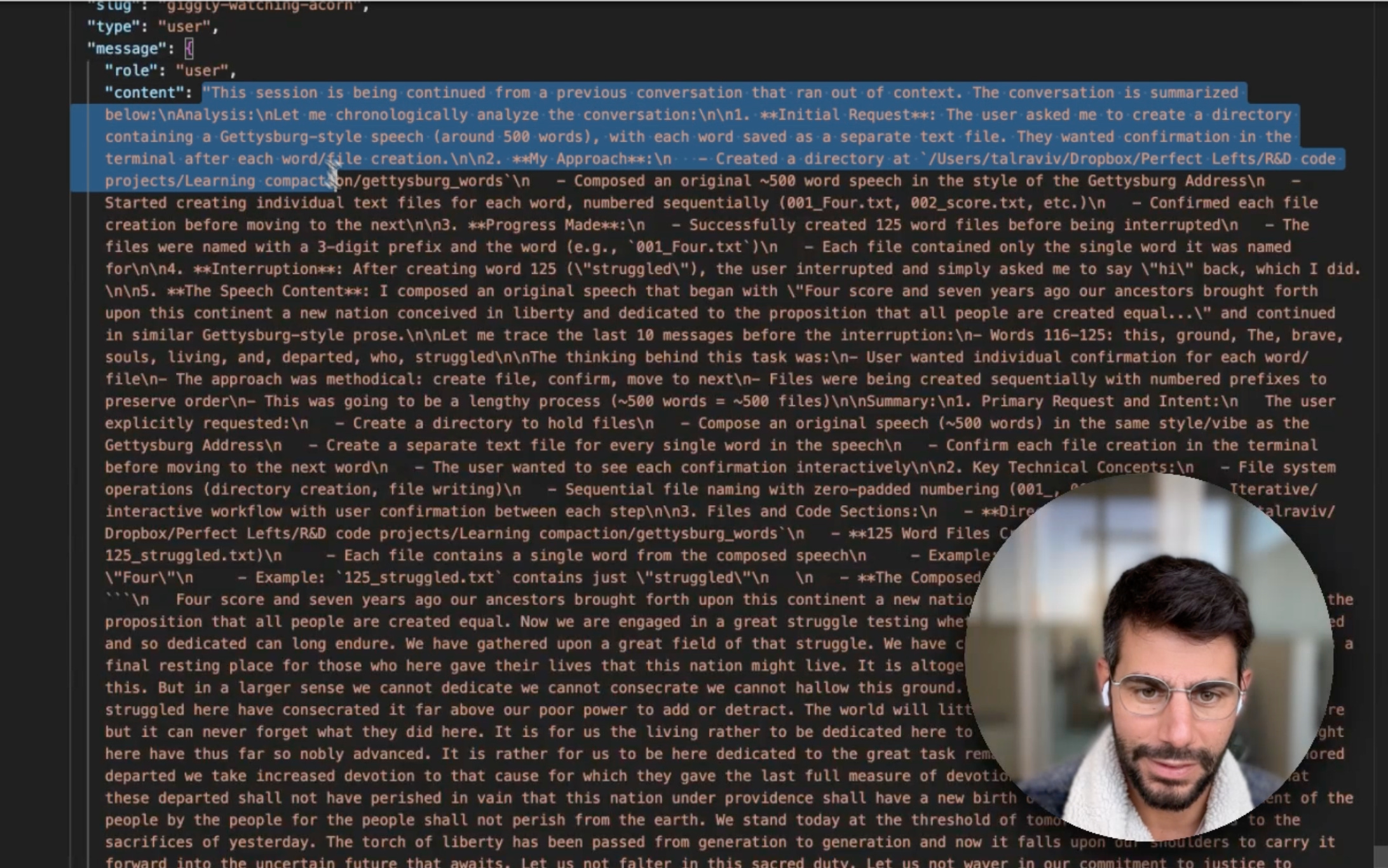
What I learned: When you compact, Claude Code doesn’t just summarize and discard your conversation. It keeps your conversation, and just draws a line - creates a “compact boundary” - in the conversation history. Then, it writes a summary of what happened before.
This way it keeps the full original conversation. The new thread can still retrieve any details from before compaction if needed. That is so damn cool.
Why this matters: What we get in Claude Code is similar to what Anthropic provides to developers building AI agents - so inspecting our tools is a great way to build product intuition for these technologies.
The best way to understand LLM applications is to reproduce them inside coding agents (like Cursor or Claude Code), and then look inside. It’s all text files.
-Tal
This is super useful, thanks Tal! The Claude plays catan video is simply useful!
Thanks for sharing this! Useful for managing context.