


OpenClaw (né Clawdbot) gives Claude Code full control over your laptop, leaves it alone unsupervised, and you can only text with it while you’re away.
That sentence feels exciting and terrifying at the same time.
I’m going to skip the superlatives. Instead, I’ll make four contradicting statements:
There’s no magic ingredient in OpenClaw that didn’t exist before.
It’s like nothing you’ve ever experienced.
It’s incredibly dangerous and risky.
It absolutely should inspire a generation of companies.
All of those things can be true.
You might have also seen the “AGI!” screaming on social media. No one knows what “AGI” means, but if you define it as being able to be on-the-go and texting an AI employee back at the office who can can do anything a human can on a computer, that’s what this is.
The best part is, it had nothing to do with “insane new AI model” or even agent harness. It was just a matter of breaking unspoken rules, and giving unreasonable permissions that responsible people decided not to do until now.
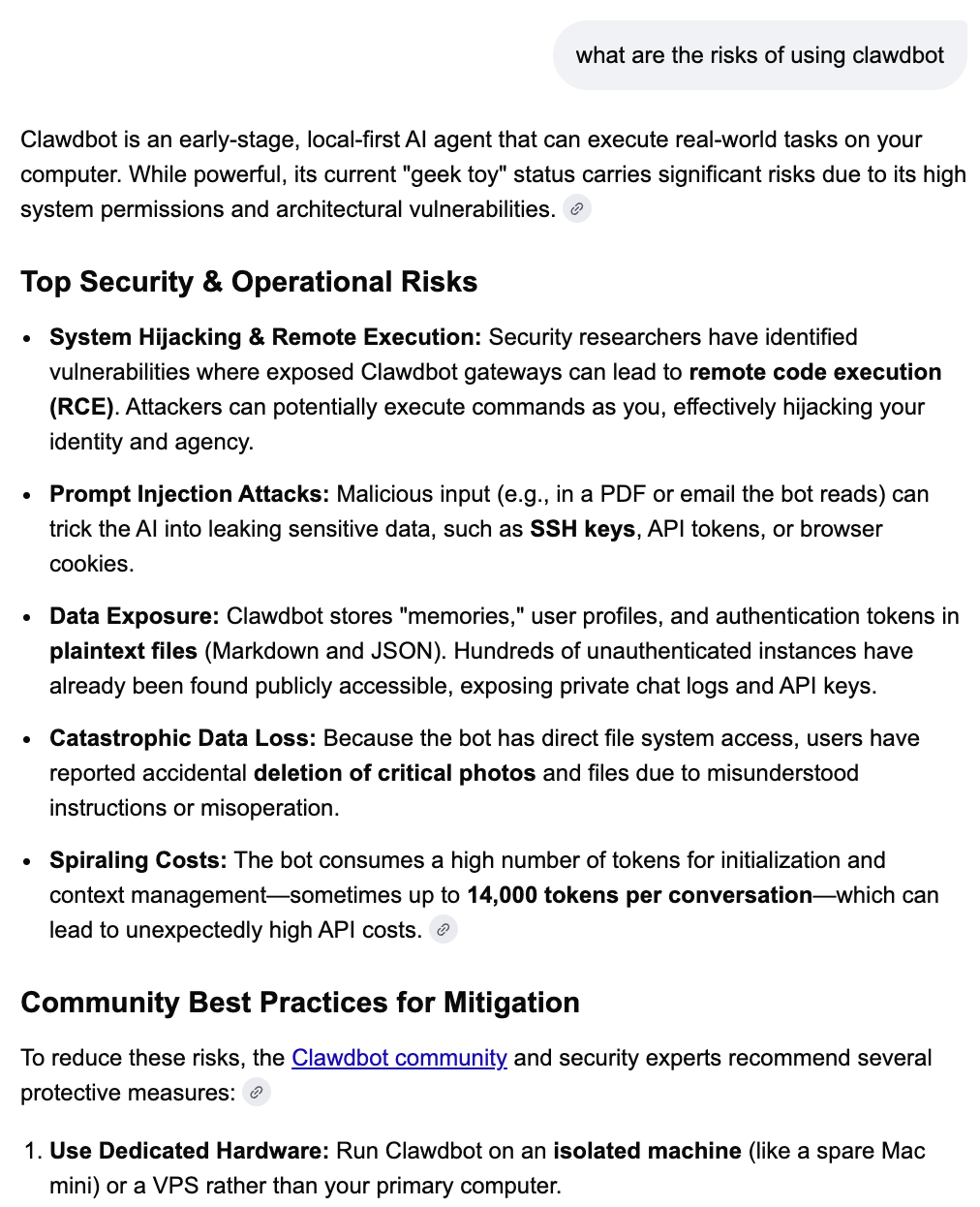
Meaning, all this was possible, but no legitimate company would dare release something like this. It took an open source project by a financially independent entrepreneur (Pete Steinberger) to say “fuck it” and lob this thing into a crowd of unrestrained software developers.
🛑 Please don’t implement anything in this post until you read the section about security, at the end.
These videos are for non-technical product folks
I made this as a product person who wants to understand one layer down. Our job as product people will be to make this technology (or some form of it) accessible to a lot more people than it is today. To do that, it’s really important to build a strong AI product sense for how this product works.
This post is a free mini-course in OpenClaw for non-technical product people. We’re going to take this apart together, step by step, so you have a deep intuition for how this works and how to apply it to your customers.
Quick note: I filmed these videos as “ClawdBot” but Anthropic’s lawyers made the (free, open source) project change its name mid-recording. It’s now called “OpenClaw.”
Special thank you to Maxim Vovshin, Peter Yang, and Aman Khan for their contagious, hands-on, hacker energy.
Understanding how it works
First, I let Cursor hold my hand and be my technical tutor throughout
OpenClaw is difficult and esoteric to set up. The docs are a mess. It’s a huge barrier to entry for somebody non-technical. I later realized this is good friction given how dangerous this is. This should not be easy.
So, I probably shouldn’t say this, but I got around the complexity by letting my AI coding agent handle everything for me. I could even ask dumb questions throughout the process.
To do this, I let Cursor clone the open-source repository and run it, rather than running it according to the website instructions. This ended up saving my ass, see “security” section at the end.
I asked Cursor to explain things to me slowly
Since it’s an open-source project on GitHub, I could give the URL to Cursor and have it copy the code to my computer. Anytime I needed something explained, I could ask Cursor to read the code and spell it out for me slowly.
What I did here:
Cloned the GitHub repository into Cursor so I could explore the code
Before running anything, indulged my curiosity by asking Cursor to explain the technical elements to me (gateway, agent loop, WhatsApp connection)
Learned it’s just three existing things combined: Claude Code + more permissions + optional Whatsapp/Telegram
Understood the system prompt structure (identity, tools, skills, memory)
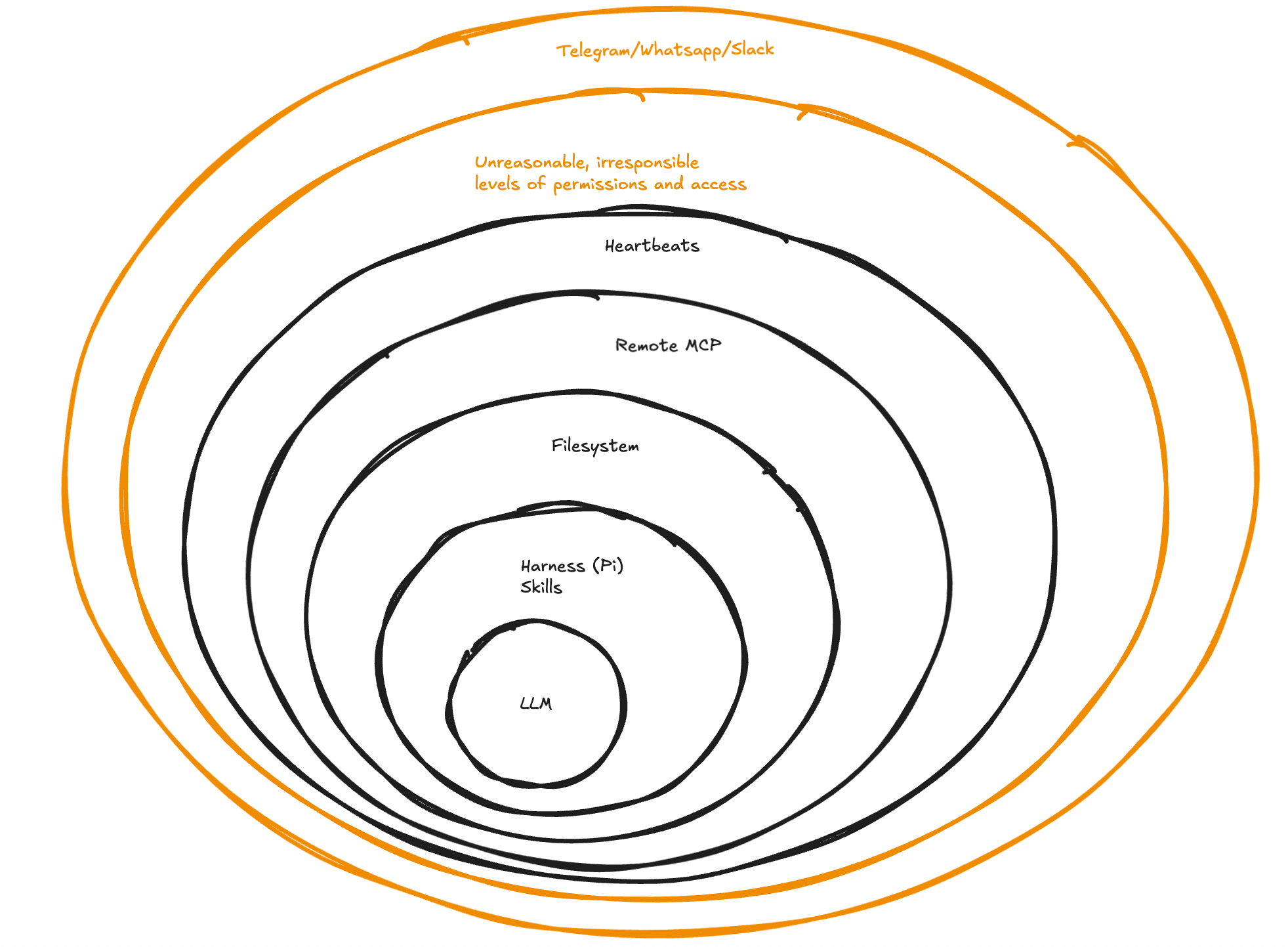
Ingredient #1: The Claude Opus 4.5 model
It’s funny to write “Claude Opus 4.5 isn’t new” because it was released 63 days ago. It’s a much better model in many ways than its predecessors, particularly on the being-good-at-calling-tools-and-reasoning-its-way-around front.
Even though it wasn’t 10X better, it was a big step forward and it enabled a lot of things that were not possible before, in an exponential way.
Ingredient #2: Agent harness (in this case, Pi)
This is the program on your computer that keeps calling the LLM API. it holds the chats, it calls the tools, and it keeps calling the LLM any time something new comes up so the LLM can give its response and decide what to do.
This is the same as your local coding agent. For example, Claude Code is available to developers as an SDK. All the cool features you see in Claude Code (skills, subagents, basic tools) are available to anybody building their product.
Pi, by Mario Zechner, is a super minimalist version of this.
Ingredient #3: Unreasonable, unsafe levels of access
Claude Code can only run commands in your terminal—and that’s already risky. OpenClaw is that plus even more abilities, like being able to run your browser with all your authenticated cookies. You can even give it access to your password manager 😱.
We’ll talk about the full ecosystem of skills and tools a bit later.
Ingredient #4: Whatsapp/Telegram/Slack with it from your mobile phone, on the go
I originally assumed this was a gimmick. I eventually came around to truly appreciate how boss it feels to step away and just text with the thing.
How does the AI agent have Whatsapp/Telegram? if you’ve ever used Whatsapp desktop or Telegram desktop, you’ve had to go through the process of scanning a QR code with your mobile app to authorize the desktop app. There’s an open-source library that allows any desktop app to show you a similar QR code, and receive the same permissions as Whatsapp/Telegram desktop apps have.
You have two options:
Give it its own phone number (that only you know)
Have it use your Whatsapp/Telegram account
While the latter is easier, remember you’re granting an autonomous AI agent access to all your DMs and group chats, and trusting it to only read the ones you told it to.
How the ingredients mix together
There’s a long-running process on your physical laptop that listens to Whatsapp messages. When those messages arrive, it sends them to Claude Code (just like you’d hit enter in a chat box). Claude Code can then execute a ton of tools it was never meant to have.
You can read the system prompt
At the top of every agent thread, there’s a system prompt. AI models tend to weight that more heavily just as a result of their training. It’s just text in a context window, but it’s the first thing there.
OpenClaw’s system prompt is a big template with lots of blanks to fill in:
Identity (who it is)
Tools available (what it can do)
Skills (capabilities it can use)
Memory (what it remembers about you)
Current date and time (so it knows when it is)
Permission to give silent replies if it has nothing to say
Understanding the building blocks means you can think about recombining them yourself. It’s good models + simple agent loops + lots of tools.
You can build with these same ingredients for your customers.
Setting up OpenClaw
What I did here:
Let Cursor run the installation commands for me
Used Cursor to explain confusing onboarding options (hooks, skills, memory)
Set up personal WhatsApp (it has access to all my messages, trusts me to only send relevant ones)
Added allow list so only I can trigger it
Skipped scary options I didn’t understand yet
Until now we were just letting Cursor read the code, and hadn’t run anything. Let’s set it up!
I put Cursor in agent mode and told it to set it up for me. Again, Cursor is my technical tutor holding my hand here. Cursor can run all the necessary commands and it can see the output if they succeed or fail and decide to try something else. (All of the docs are also part of the open source repository, so Cursor could read those directly.)
Cursor asked me if I wanted it to take care of the onboarding or I wanted to go through it myself. I decided to experience it directly. Still, I ran the onboarding in a terminal inside Cursor, so I could still keep the left side of my screen to be a Cursor agent chat. That way, I could ask all my dumb questions if a technical term in the onboarding didn’t make sense, or I didn’t know how to answer a question
For example, I had no idea what “hooks” were in this context. So I asked Cursor. Turns out hooks are nice things like:
Session memory
Startup tasks that happen when you boot it up
Heartbeats: tasks that run on a schedule (we’ll get to this later)
It asked for my OpenAI API key so I can use Whisper. And my 11 Labs API key so it can talk back to me in voice. I was happy to fetch both.
This onboarding was not very self-explanatory. But using an AI coding agent as my tutor made it accessible. I basically asked “what the hell is this?” at every step.
First signs of life
With onboarding done, it sprung to life and loaded up a web chat (I hadn’t set up texting yet).
What I learned here:
Bootstrap.md is the “birth” file (used once, then deleted)
Memory is just text files (identity.md, user.md, soul.md, memory files)
OpenClaw said, “I’ve got bootstrap.md here.” So I turned to Cursor and asked, “What the hell is a bootstrap.md?”
Cursor searched through all the files and explained that when OpenClaw starts up, if it sees the existence of this file, it knows it’s the first time it’s been run. Bootstrap.md is used once as instructions to interview me, save those answers in other files, and then deleted.
My answers are stored in long-term memory as, you guessed it, text files! We’ve got an agents.md, a soul.md, an identity.md, a user.md. They could all be in one file, but they’re separate because it’s nicer (?).
Fine FINE it’s magical
No matter how much I tried to deconstruct OpenClaw into its ingredients, it was impossible to stay skeptical when it started doing things.
What I did here:
Requested a flight search
Watched it control my browser and iterate
Saw how it converts HTML to an accessibility tree to understand the page
“Show me what you can do,” I said to OpenClaw. It came back with a list of abilities. Browser control caught my eye.
Fine. “Can you search for a flight for me on Google Flights from Tel Aviv to Los Angeles in early March, after March 7th.” And…. it launched Chrome… and it did just that.
It took control of my computer. It was trying things. If you’ve ever watched an AI coding agent at work—iterating, trying something, get the result back, try again—it felt the same, but now it’s broken out of the terminal.
Waking up on its own: “heartbeats”
What I did here:
Set up a flight price tracker that runs on a schedule
Learned heartbeats are cron jobs for AI
Understood it only works if your computer is on (hence Mac Minis)
Watched it edit its own heartbeat.md file with scheduling logic
I saw the list it gave me also had “heartbeats,” so I asked it to show me using my flight search example.
Heartbeats are scheduled processes. Once in a while, it’s going to check Google Flights. It edited the heartbeat.md file. It decided to keep some memory here of what the prices were. It came up with alert logic.
There’s a reason very few frontier LLM agents run autonomously without a human hitting enter: it can get very expensive, very fast. “Heartbeats” lets you do it anyways.
Your computer needs to be always on
I asked: does my computer need to be on for this to work?
Yes. This is why people are purchasing computers to run this (real or virtual). I initially rolled my eyes watching Aman Khan and Peter Yang discuss their plans to buy Mac Minis and then…

My mind is running wild. But I’m trying to stay grounded, reminding myself: this is Opus, which we’ve had, wrapped in Claude Agent SDK, which is just Claude Code, wrapped in OpenClaw, which just gives access to anything all the time.
This is getting super expensive, super insecure. And I love it.
OpenClaw’s skills
What I learned here:
Anything you’d use your computer for can become a skill: 1Password, Apple Notes, Notion, GitHub…. it can even run Claude Code (that’s meta) or Codex etc.
A worldwide community of developers is hard at work building skills for you
Since OpenClaw wraps the Claude Agent SDK (which, as you remember, powers Claude Code), it is built to use Skills! (A Skill is a saved prompt that an LLM can decide to pull in.)
There’s also a whole community of people developing these:
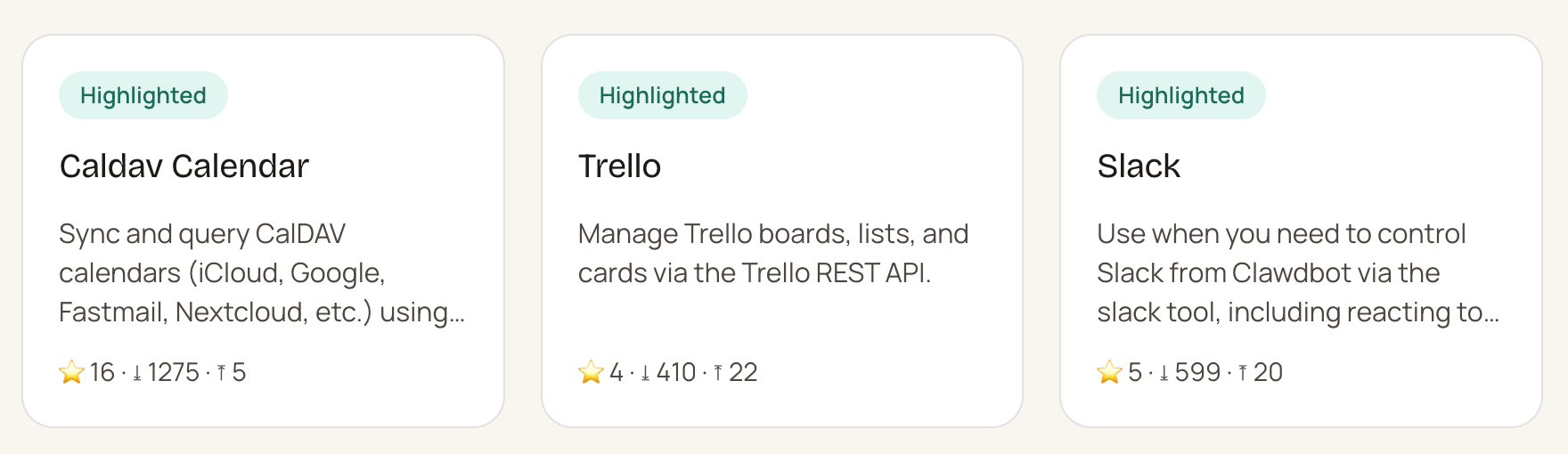
Every time I see another software app available as a skill, I feel excited and horrified at the same time.
Basically anything that you would use your computer for, you can install these skills. It’s gonna take me a while to wrap my mind around the geometric explosion of use cases this allows.
Texting with OpenClaw on Telegram
What I did here:
Set up Telegram as another channel (with Cursor’s help)
Asked it to search for flights from my phone via Telegram
Watched it control my computer while I was away from it
Telegram is a little bit easier to set up than Whatsapp. I asked Cursor for help and it walked me through it step-by-step.
And then… well, putting that in words feels silly, the video captures this better.
It is amazing how much the same ingredients that have existed can be rearranged in a way, with a little bit of not giving a fuck and nothing to lose, can just do magical things.
Voice messages
What I tested here:
Sent a voice message
Watched it transcribe with OpenAI’s Whisper model
Received a voice message back (ElevenLabs text-to-speech)
Recognized this is more existing ingredients combined
Um, I sent it a voice message, and it responded with a voice message.
Part of me wants to let go and enjoy the magic. Another part of me just keeps deconstructing it and saying: all these things existed. Voice messages, 11 Labs text-to-speech, Whisper speech-to-text, Claude Code, Opus. They’re just being all put together.
Goddamnit, it’s magic.
Security (boo! I mean yay!)
What I did here:
Ran the security audit with Cursor (THIS IS NOT ENOUGH)
Learned about prompt injection risks (THIS IS THE LEAST OF OUR WORRIES)
Decided to treat this as inspiration, and then shut it off (TURNS OUT IT DIDN’T REALLY TURN OFF)
I told Cursor I was worried about security. What could make this more secure? What are the risks that I should be aware of?
Cursor told me there’s a security audit I should run regularly, and so I did. That’s not enough at all.
I’ll bottom line it: there’s a ton of risks you can see and don’t see. It’s easy to make a tiny mistake and leave yourself (and your employer) very exposed.
Oh, and a day later it turns out I didn’t really turn it off. I found out by accident, only because it launched my “flight search heartbeat” I happened to schedule.
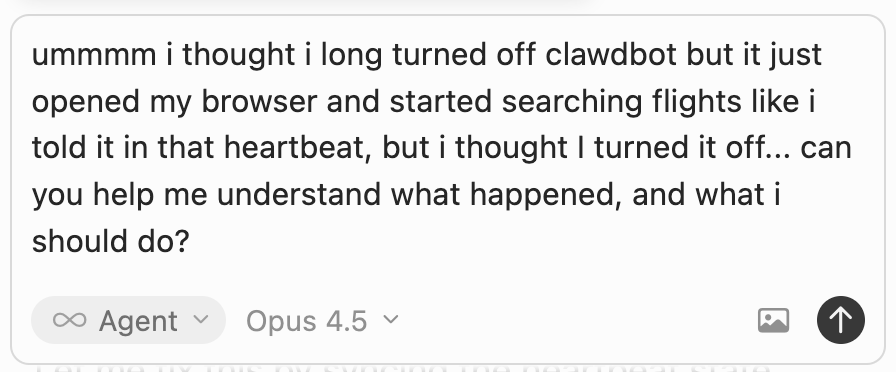
I was sooooooo glad I was working with OpenClaw with Cursor as my intermediary, I have no idea what I’d do otherwise.
If there haven’t been any large-scale disasters attributed to AI until now, OpenClaw is 100% where they’re going to come from. But also, we can’t not try. Hashtag humanity.
The right way to do this could be a separate computer with very limited permissions. Maybe give it a separate user. Maybe give it access to some accounts.
Or just don’t use it. Sometimes the right answer is “this is cool, let’s learn from it, now let’s turn it off.” (That’s gonna take a lot of self-restraint.)
What to do with this
OpenClaw is a beautiful source of inspiration that should make a lot of product teams ask “how can we bring this magic to our industry in a way that’s way more accessible than this and way more secure?”
All the ingredients were there in the open. It just took somebody who had nothing to gain and nothing to lose to say “fuck it” and combine all the ingredients without worrying about the consequences.
Now the world has one big, fat proof of concept done as an open source project in public, that should not be used by most people for most of the time.
Install it. Understand it. Get inspired. Turn it off.
Then go bring this magic to your customers in a way that’s actually responsible.
If you found this helpful, you definitely know that AI may have made building cheap, but knowing what to build has never been harder. Hilary Gridley, Aman Khan, and I banded together to host a free Lightning Lesson to give you a repeatable system for validating AI ideas cheaply, so you can distinguish between novelty and lasting value.

This post is EPIC!
Thanks so much for sharing all this. I definitely think MoltBot must be treated as an intern with it's own computer and accounts which only works with shared files (with a backup somewhere else) and no access to a credit card or critical permissions in real workflows...
This is so thorough! Thanks for putting this together.